Page 2 – Rigol UK

EMC Precompliance Testing

Posted on: August 20th, 2021 by James

Why is Pre-Compliance Testing done?
Almost any electronic design slated for commercial use is subject to EMC (Electromagnetic Compatibility) testing. Any company intending to sell these products into a country must ensure that the product is tested versus specifications set forth by the regulatory body of that country. In the USA, the FCC specifies rules on EMC testing. CISPR and IEC test definitions are also commonly used throughout the world.
To be sold legally, a sample of the electronic product must pass a series of tests. In many cases, companies can self- certify, but they must have detailed reports of the test conditions and data. Many companies choose to have these tests performed by an accredited compliance company. This full compliance testing can be expensive with many labs charging thousands of dollars for a single day of testing. Testing a product for full compliance can also require specialized testing environments. Any failures in compliance testing require that the design heads back to Engineering for analysis and possible redesign. This can cause delays in product release and an obvious increase in design costs.
One of the best methods to lower the additional costs associated with EMC compliance is to perform EMC testing throughout the design process well before sending the product off for full compliance testing. This pre-compliance testing can be cost effective and can be tailored to closely match the conditions used for compliance testing. Pre- compliance Testing can range from basic signal visualization with a spectrum analyser to validation testing against limits or standards and even to interactive debugging. These types of pre-compliance testing require different probes, setups, and tools. Basic visualization, comparison versus standard limits or previous results, and debugging all play important roles in EMI testing to improve your designs, lowers your test costs, and speed your time to market. In this application note, we will compare the advantages, requirements, and available solutions for each type of pre-compliance analysis.
Basic Visualisation
Near Field Probes for Radiated Emissions
The simplest pre-compliance measurements involve visualizing and analysing the magnetic fields resulting from emissions. These test setups start with a spectrum analyser, like the RIGOL RSA3030 (Figure 1). For radiated emissions, use near field magnetic (H field) probes as shown in Figure 2.
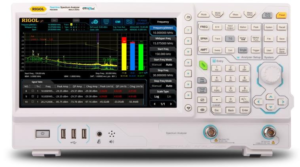
Figure 1: Rigol RSA3000 Spectrum Analyser with EMI
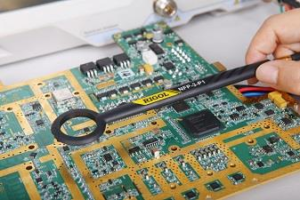
Figure 2: Near Field E and H Probes used to identify EMI Sources


Near field probes pick up emissions that pass through the small loop at the end of the probe. These magnetic probes are relatively inexpensive and make it possible to capture signals only in close proximity to the probe, hence the name ‘near field’ probe. This makes them well suited to basic visualization because engineers can quickly scan a new board or enclosure looking for problems by passing the probe over the area as demonstrated in Figure 3. A basic configuration of a near field radiated emissions test would be simply configuring the analyser to use the peak detector and set the RBW and Span for the area of interest per the regulatory requirements for your device. The Peak detector will provide you with a “worst case” reading on the radiated RF and it is the quickest path to determining the problem areas. Then select the proper H field probe for your design and scan over the surface of the design. Larger probes will give you a faster scanning rate, albeit with less spatial resolution.
The probes act as an antenna, picking up radiated emissions from seams, openings, traces, and other elements that could be emitting RF. A thorough scan of all of the circuit elements, connectors, knobs, openings in the case, and seams is crucial. Chambers and shielding are usually not needed for this type of EMI visualization since the probe registers only very close signals. Engineers can often determine the source of an emission by orienting and locating the probe along the test device. The downside to this approach is that there is no easy correlation between near field measurements and compliance results and making repeatable measurements is difficult due to probe positioning. Therefore, engineers must think critically about detected emissions and determine whether they are worth worrying about before going to the expense of further validation.
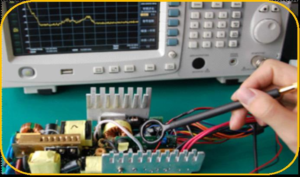
Figure 3: Using an H field probe to test a power supply


RF Current Probes for Conducted Emissions
Conducted emissions are unwanted signals that travel via cables. The most common issue is when devices send RF signals back into the power line. There are specific limits associated with these types of emissions designed to protect the power grid and other devices on the circuit. When visualizing conducted emissions engineers use an RF current probe like those in Figure 4. Current flow in a cable placed within the probe is shown on the spectrum analyser. This makes it possible to visualize signals being coupled into a communication or power cable from either the device under test or from external sources. The conducted emissions from a simple LED light fixture are shown in Figure 5. Even simple electronics like this can couple significant power switching frequencies back into the power line. After visualizing these signals care can be taken to filter or improve them if needed before further analysis.
When combined with a spectrum analyser both near field probes and RF current probes are low cost basic visualization solutions for EMI signals. They provide insight without the cost of a more complete EMI system.
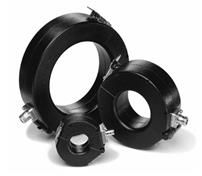
Figure 4: RF Current Probes for Conducted Emissions
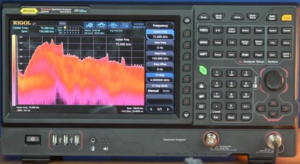
Figure 5: Conducted Emission profile of an LED light fixture


Pre-Compliance Validation Testing
Limits, Standards, Detectors, and Data Management
Once the testing turns to validation, near field measurements still provide important insights, but the wand style probes can be frustrating since slight changes in position or orientation will affect the results. This makes it impossible to compare to standardized test results or even gauge improvement from one version to another. A full compliance setup with calibrated antennas, an EMI receiver, and a chamber could make final compliance tests, but the cost to setup and maintain this setup can be overwhelming. Fortunately, there are tools that help bridge this gap by making relative analysis simpler. With the right setup engineers can evaluate new designs versus known good designs and compare versus established standards. Getting the most out of this type of pre-compliance validation testing requires additional instrumentation capabilities as well as a more stable test setup.
For this type of pre-compliance testing spectrum analysers should include the standard EMI bandwidths and CISPR detectors. The analyser also needs to be able to segment scans using preferred settings for different areas of the spectrum to optimize sweep time and required accuracy. Most importantly, a spectrum analyser must include standard limit lines as well as the ability to customize limit and margin levels. This is critical because without a calibrated chamber alterations must be made for the test environment in order to build confidence in the results. Lastly, the analyser must be able to create, archive, and compare tests and reports so engineers can problem solve any issues or concerns that arise later in the design process. While not an EMI Receiver, RIGOL’s RSA3000 and RSA5000 series spectrum analysers with the EMI application mode (Figure 6) include all of these features in a single box validation solution.
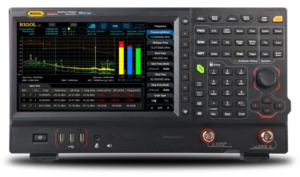
Figure 6: Rigol RSA5000 Series Real-Time Spectrum Analyser with EMI

The EMI measurement mode provides the RSA Series spectrum analysers with limits and CISPR detector modes including Quasi-Peak, CISPR Average, and RMS Average. Engineers also have access to the standard EMI resolution bandwidths (200 Hz, 9 kHz, 120 kHz, and 1 MHz). EMI mode (Figure 7) operates entirely within the instrument from the touch screen or with a mouse and keyboard. This makes it easy to archive reports, run scans, and jump to a signal of interest and immediately debug when needed. The bar graph on the right shows real-time measurements at a given frequency of interest. This utility is made to quickly move to a signal of interest right after a scan without having to change modes. It can show live measurements on up to 3 detectors at the frequency of interest providing an easy transition to debugging and further analysis.
For engineers using a common EMI test software platform, their software toolkits provide flexibility by integrating components from multiple test vendors. Many of these pre- compliance software packages support spectrum analysers including models made by RIGOL. All RIGOL spectrum analysers can be programmed over USB or Ethernet using a standard SCPI instruction set.
EMI Mode on the RSA family of spectrum analysers is a powerful solution providing all the capabilities of a complete EMI validation software package within the instrument.
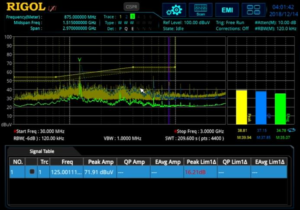
Figure 7: EMI mode using limits, multiple detectors, and meters on a RSA series, Real-Time Spectrum Analyser

TEM Cell setups for repeatable measurements
For a test setup with more repeatable measurements than near field probes we can look to TEM Cells. A TEM (Transverse Electro-Magnetic) Cell (Figure 8) is a low cost alternative to measurements in an anechoic chamber. A TEM Cell is a near field device for radiated and immunity measurements. Because the device under test sits at a fixed location within the cell test results are easier to compare and repeat over time than with just a probe. While not directly correlated to far field chamber measurements, a TEM Cell takes repeatable measurements. When used with a complete EMI application tool, new designs can be compared to known good devices and custom limits can be established or developed from known standards that incorporate background emissions, limitations of the test setup, and correction tables. Used in this way, a TEM cell setup with RIGOL’s EMI Mode builds confidence in final compliance results by making it easy to compare good devices, failed devices, and new designs against corrected limit lines with appropriate margin. A repeatable test setup and RIGOL’s EMI Application mode provide an affordable test bed for EMI pre-compliance validation and comparison.
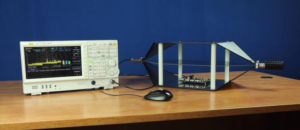
Figure 8: A TEM Cell for repeatable radiated emissions testing

EMI Debugging
Real-Time
Once validation tests are completed on a new design, areas of concern are identified and require additional debugging or trouble shooting. Emission issues not captured by basic visualization are often dynamic or dependent on the operating state of the design being tested. These issues can be difficult to capture and understand in a typical swept EMI mode. The combination of a repeatable test setup and a real-time spectrum analyser provide additional debugging capabilities. The RIGOL RSA Series analysers provide multiple views valuable in debugging signals that change over time including density, spectrogram, and power vs time (shown in Figure 9 and Figure 10). In real-time mode the RSA is capable of making seamless measurements. Capture a spectrum without sweeping or missing critical signal activity. Debugging in real-time means that infrequency emissions that might affect compliance are easy to characterize, and with a sense of time, it is much easier to establish the ultimate cause in the design.
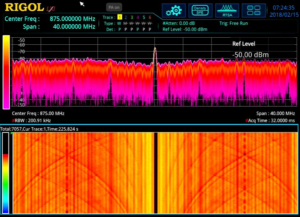
Figure 9: Debugging emissions with the density display (top) and the spectrogram waterfall chart (bottom)
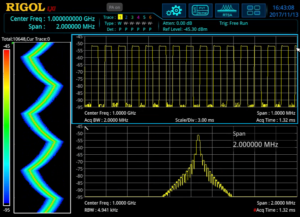
Figure 10: Debugging with a combined view of the spectrum (bottom), power over time (top), and spectogram (left)


Debugging with Time Correlation
Additionally, the RSAs have an IF Output. For advanced time correlation of emissions events with embedded signals this IF Output can be input into a mixed signal oscilloscope like the RIGOL MSO7054. This brings the RF signal down to a carrier visible to the scope. In this configuration the RF signal can be viewed alongside digital channels to debug embedded code and communications. To learn more about debugging with the IF output go to our Multi Domain Debugging web page.
Testing emissions with real-time debugging and time correlation for root cause analysis in a repeatable TEM Cell setup is a cost effective system configuration for many of the common EMI design challenges.
Unprecedented Value
EMC Compliance testing is mandatory for the majority of electronic products that are slated for sale throughout the world. Select your instruments and design your test setup to get the most out of your EMI budget for any Pre-Compliance use case. With the right spectrum analyser, visualize emissions with near field and RF probes. Then, validate EMI pre-compliance measurements against known emissions data. Finally, debug and time correlate signals of interest to improve the design. These pre-compliance test setups will help speed product development and save time and money in your design process.

Products Mentioned In This Article:

  • MSO7054 please see HERE
  • RSA3000 Series please see HERE
  • RSA5000 Series please see HERE
  • TEM Cells please see HERE 
Posted in Blog | Comments Off on EMC Precompliance Testing

EMC Precompliance: Conducted Emission Testing

Posted on: August 20th, 2021 by James

EMC Precompliance Testing: Conducted Emissions

Electromagnetic Interference (EMI) can cause undesirable effects on electronic products. These effects can range from annoying glitches to rendering a product unusable.
In an effort to minimise these issues, countries have established standards and limits to products that are being sold within that market. This Electromagnetic Compatibility (EMC) testing is an integral part of product design and qualification for any electronics intended for sale within those markets.
In almost every case, these specifications contain limits on conducted and emitted radiation testing. Conducted emissions are those that propagate through the power line connecting the instrument (Equipment Under Test, or EUT here). Radiated emissions are those that are emitted into the area surrounding the EUT.
This note will briefly cover some common practices for conducted emission testing early in the design phase and we will cover the radiated emissions in another note.

A Word about Precompliance
For full qualification testing, a CISPR 16 qualified EMI Receiver and the proper setup must be used. This generally requires using a certified testing lab and special equipment that can be cost prohibitive for development and design tweaking.
This note covers pre-compliance measurements using a Rigol DSA-815 Spectrum Analyser with the optional EMI Measurement Kit (Part Number DSA800-EMI).
While not fully providing fully compliant measurement data, pre-compliance testing can give you critical visibility into the design limitations of your design. You can find the sources of your EMI and try to limit their contributions before the fully compliant testing even begins.
Perhaps the best methodology is to perform a number of pre-compliance tests on a product using a number of physical configurations. Then, compare that data to the data collected in a fully compliant setup.
Using this “Golden Standard” comparison can give you confidence in your pre-compliance measurements and also give you insight into your testing deficiencies. Many of the differences may be systematic and accounted for by allowing for a bigger error cushion on the limits you are testing against.
Physical measurement setup
The more closely you can match a full compliance setup, the more closely your data will match with the lab. But, this isn’t always practical.
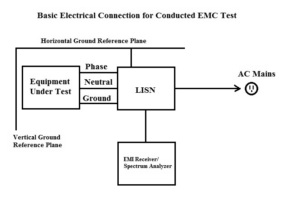
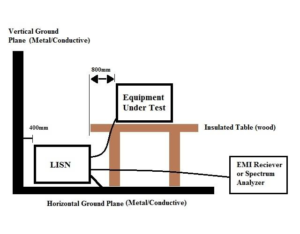
The following diagrams show the standard suggested electrical and physical setups for testing conducted emissions:

Figure 1: Electrical connections for Conducted EMC Testing.

Figure 2: Physical connections for Conducted EMC Testing.


The key points:

  • The horizontal and vertical ground planes are typically sheets of metal with surface areas twice the dimensions of the Equipment-Under-Test.
  • The horizontal and vertical ground planes should be electrically bonded to each other.
  • Equipment placed on insulated table over the horizontal ground plane. No equipment or cabling should run below the equipment.
  • LISN electrically bonded to the horizontal ground plane. LISN is short for Line Impedance Stabilization Network. Its job is to separate the AC Mains noise from the conducted noise being generated by the Equipment-Under- Test. Please select a LISN that has the proper voltage, current, and frequency ranges for your equipment-under-test.
  • Do not coil cables. You want to minimise inductive loops by laying cabling out smoothly.
  • The spectrum analyser should be placed some distance away from the horizontal ground plane. Typically, it is a few feet away.

Test Procedure
Once you have setup the EUT and bonded the LISN and ground planes, power on the DSA815 for at least 30 minutes to ensure stability and accuracy.
Configure Spectrum Analyser

  • Enable the EMI filter by pressing BW/DET > Filter Type > EMI
  • Set Resolution Bandwidth by pressing BW > RBW

NOTE: The resolution bandwidth is determined by the standard and specific device type you are testing. As an example, FCC subpart-15 specifies an RBW of 9kHz when testing from 150kHz to 30MHz.
You should consult the standards you are testing to for more information on the specifications governing your testing.
NOTE: Many specifications give limits and values in dBuV or V.
Optional: Set scale for volts by pressing AMPT > Units > V

NOTE: The DSA-815 has a pass/fail feature that will allow you to configure an upper limit line. This can be useful when evaluating the frequency scan respect to the limits set forth by the EMC standard you are testing to.
You can also save any limit lines to the internal storage, once it has been created. Simply configure the limit line on the instrument, press Storage > change File Type to Limit, and save the file.
Optional: Add an upper limit line by pressing Trace/ P/F > Pass/Fail > Switch ON > Setup > Upper > Edit and configure point 1 to have an X Axis start at 150kHz with an amplitude of 1mV.
Next, add a point 2 with start at 30MHz and an amplitude of 1mV. Set Connected to Yes for point 2.
This will connect point 1 and 2 with a purple line. This denotes the upper Pass/Fail line.

  • Set detector type to Peak by pressing BW/Det > Type > Pos Peak
  • Set the attenuator to 10dB by pressing AMPT > Input Atten > 10dB
  • If the signal is unknown, adding significant external attenuation will minimise the likelihood of damage to the sensitive front end of the spectrum analyser.

NOTE: There are two reasons to add attenuation. The attenuator protects the input circuit from any unknown signals that could damage the input. It also serves as a convenient check on overloading after we check the background readings.
The DSA has protection circuitry, but there are transients that are too fast to protect against.

  • Set frequency start, stop values set forth in the EMC Specifications that apply to the product. In this example, we are going to configure the instrument to sweep from 150kHz to 30MHz by pressing FREQ > Start and set to 150kHz. Then, press FREQ > Stop and set to 30MHz.
  • Set the RBW to the value set forth in the EMC Specifications that apply to the product by pressing BW/Det > RBW > 9kHz

Check background readings

  • Power up LISN
  • Connect Spectrum Analyser to the LISN output
  • Scan over the frequency band of interest using the detector set to Peak and with the attenuator set to 10dB.
  • Optional: If you are not using the Pass/Fail line, you can freeze the background trace for reference by pressing Trace/ P/F > Trace Type > Freeze or you can store the trace data by using a USB drive and the storage menu for offline analysis. Either way, noting the peak values and frequencies of the base electrical environment is important.

Peak Test

  • Disconnect the Spectrum Analyser from LISN
  • Connect EUT
  • Reconnect Spectrum Analyser to LISN. This process helps to minimise damage to the Spectrum Analyser due to transients on the input
  • On the Spectrum analyser, set up a new trace as Clear by pressing Trace/P/F > Select trace 1 > Trace Type > Clear
    NOTE: This setting will overwrite the trace with new data as the scan continues through its frequency range.
  • Observe the conducted emissions scan.. and adjust the attenuation value to 20dB. If the line does not change for different attenuation values, then it is likely that you are not overloading the input and the measurement quality is high. You can proceed with the pre-compliance testing.

If the scan changes value with different attenuation settings, then it is likely that the input is being overloaded with broadband power and additional attenuation is recommended. You can try comparing scans of 20dB and 30dB, etc.. until a range is found without variation.
You want to select the smallest attenuation value that does not show errors due to the overloading effects of the input signal.
In the worst case, the EUT may not be able to be successfully tested with a Spectrum Analyser. You may need to test using a true EMI receiver with pre-selection filters.

Observe conducted emissions and look for frequency lines that are above the limit line you have set. Make note of the frequencies failing the limit lines.
Quasi-peak Scans

  • Using the failed frequencies above, adjust the spectrum analyser to center the failed peak.
  • Note the RBW setting for your scan, and make the frequency span 2x the RBW setting used for the peak scan by pressing FREQ > Start and FREQ > Stop
    NOTE: If there is an over limit peak at 10MHz, and an RBW of 120kHz, then you would center your QP Scan at 10MHz, and scan from 9.88MHz to 10.12 MHz.
  • Change the detector type to Quasi-peak ( )
    NOTE: The Quasi-peak detector is based on charge and discharge times of a standardised resonant circuit. This detector type can take greater than 3x the scan time of a peak measurement. That is why it is best to only use Quasi-peak over short spans. The DSA-815 digitally replicates this response.
  • Compare the quasi-peak data to the pass/fail limit line for that frequency.
  • It is advisable to keep the conducted emissions at least 10dB below the
    specified limit line. This margin of error will increase the likelihood of passing a full compliance test.
  • It is also advisable to compare your pre-compliance data and setup to that of the full compliance lab that will perform your EMC certification testing. This will allow you to identify any problems with your pre-compliance testing. With more comparisons, you will be able to hone your pre- compliance error budget and have much more confidence in the results you obtain.

Products Mentioned In This Article:

  • DSA800 Series please see HERE
  • LISN’s please see HERE
Posted in Blog | Comments Off on EMC Precompliance: Conducted Emission Testing

EMC Precompliance: Near Field Probes

Posted on: August 20th, 2021 by James

EMC Pre-Compliance Testing: Near Field Probing
Solution: Electronic products can emit unwanted electromagnetic radiation, or electromagnetic interference (EMI). Regulatory agencies, such as the FCC in North America, create standards that define the allowable limits of EMI over specific frequency ranges.
Testing designs and products for compliance to these standards can be difficult and expensive. But, there are tools and techniques that can help to minimize the cost of testing and help to enable designs to pass compliance testing quickly.
One of the most often used techniques for EMI testing is near field probing. In this technique, a spectrum analyser is used to measure electromagnetic radiation from a device-under-test using magnetic (H) field and electric (E) field probes.
In this application note, we are going to describe some common techniques used to identify problem areas using near field probes.
A Word about Pre-Compliance
Most governments have regulations in place that specify the amount of electromagnetic interference (EMI) a product can emit into the environment (radiated emissions) and conduct down the power cord (conducted emissions).
Products being sold within the areas covered by these regulations must comply with the defined test limits. Compliance tests use these regulations to define the proper instrumentation, physical setup, and experimental techniques and experience to correctly record and report properly. This testing is very important and required for legal sale of the product within the covered area. Unfortunately, compliance testing can be expensive and difficult to execute due to the specialised equipment and knowledge required to properly conduct the tests.
Pre-compliance testing simulates the major details of a compliant test setup at a lower investment in time and money. Before you go to a compliance lab for testing, you can use pre-compliance tests to gather information about the performance of a design, make changes (if needed), and retest.. all in an effort to minimize the return trips to the compliance lab.
A word of caution, however. Pre-compliance data can be useful in hunting down many, if not all, of the non-compliant areas of a design but it is not a substitute for testing at a fully accredited compliance lab. Ultimately, the company (you) is responsible for proof of compliance to the full regulations for your product.
Setup
Board level emission testing can be performed using a spectrum analyser, like the Rigol DSA-815 (9kHz to 1.5GHz), near field electric (E) and magnetic (H) probes, and the appropriate connecting cable.

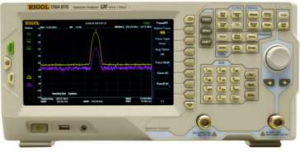
Figure 1: The Rigol DSA815-TG Spectrum Analyser.


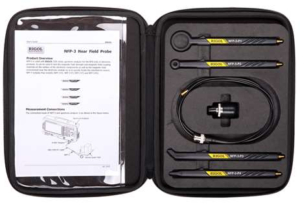
A commercial example of near field probes are the Rigol NFP-3 probes shown below:

Figure 2: Rigol NFP -3 EMC probes.


You can also build your own probes by removing a few cm of outer shield and insulator from a semi-rigid RF cable, bending it into a loop, and dipping in plastic tool dip or other insulating material. Larger diameter loops will pick up smaller signals, but do not have as much spatial resolution as smaller diameter loops.
For the first pass, configure the spectrum analyser to use the peak detector. This setting ensures that the instrument is capturing the “worst case” peak RF. It also provides a fast scan rate to minimize the time spent at one position as you scan over your DUT. Larger probes will give you a faster scanning rate, albeit with less spatial resolution. Smaller probes, like the E Field probe, provide fine spatial resolution and can be used to detect RF on single pins of circuit elements.
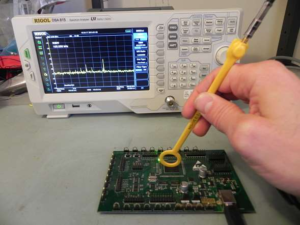
Probe orientation (rotation, distance) is also important to consider. The probes act as an antenna, picking up radiated emissions. Exposing the loop to the largest perpendicular field possible will maximize the signal strength. You can also use a fixture to hold both the Device-Under-Test (DUT) and the probe. This will help create repeatable measurements and minimize differences in measurements due to probe orientation.

Figure 3: An example of using an H field probe and spectrum analyser to find trouble spots on a board. Note the orientation of the H field probe


Take care to test enclosure seams, openings, traces, and other elements that could be emitting RF. A thorough scan of all of the circuit elements, connectors, knobs, openings in the case, and seams is crucial to identifying potential areas where RF can “leak” out of an enclosure.

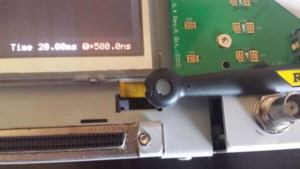
Figure 4: Measuring a display ribbon cable for emissions using an H field probe.


You can use tinfoil or conductive tape to cover suspected problem areas like vents, covers, doors, seams, and cables coming through an enclosure. Simply test the area without the foil or tape, then cover the suspected area, and rescan with the probe.
Once you have identified the physical locations of the areas that have the highest emissions, you can get more detail by implementing a few common techniques. If possible, select a spectrum analyser that has the standard configuration used in full compliance testing. This includes a Quasi-Peak detector mode, EMI filter, and Resolution Bandwidth (RBW) settings that match the full test requirements specified for your product.
This type of setup will increase testing time but should be used on the problem areas. A full compliance test utilizes these settings.. and so, your pre-compliance testing with this configuration will provide a greater degree of visibility into the EMI profile of your design.

Conclusion

In closing, near field probes and a spectrum analyser can be useful tools in troubleshooting EMI issues.
– With H field probes, try different probe orientations to help isolate problem
areas
– Remember to probe all of the seams around any enclosure surrounding electronic components/boards.. surface contact and finish effect grounding and shielding
– Openings in enclosures radiate just like solid structures. They act like
antennas.
– Ribbon cables and cables/inputs with bad shielding and grounds are common causes of radiated emissions

Products Mentioned In This Article:

  • NFP-3 please see HERE
  • DSA800 Series please see HERE
Posted in Blog | Comments Off on EMC Precompliance: Near Field Probes

Measuring Cable Loss with a Spectrum Analyser

Posted on: August 20th, 2021 by James

Testing Cable Loss with a Spectrum Analyser

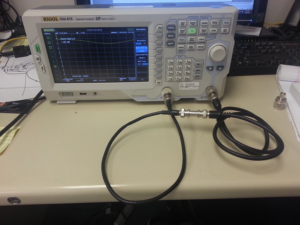
Solution: A spectrum analyser with a tracking generator can be a useful piece of test gear. This application note covers making a simple loss measurement on a coaxial cable with BNC connectors.
Required:
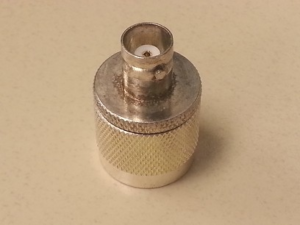
– Two N-type to BNC Adapters. Select adapters that convert N-type (in/out connectors on most spectrum analysers) to the cable type you are testing. Also note that higher quality connectors (Silver plated, Beryllium Copper pins, etc..) equal better longevity and repeatability.

Figure 1: N-type to BNC adapter


– A short reference cable with terminations that match your adapters and cable- under-test.

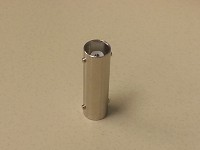
– An adapter to go between the reference cable and the cable-under-test. This experiment will use a BNC “barrel connector”. Note that higher quality connectors (Silver plated, Berylium Copper pins, etc..) equal better longevity and repeatability.

Figure 2: BNC barrel adapter


– Alternately, you can use two adapters a short cable as a reference assembly to normalize the display before making cable measurements. This removes the need to have the cable-to-cable adapter.
– Spectrum analyser with Tracking Generator (TG) Steps:
1) Turn on Spec An and attach adapters to the tracking generator (TG) output and RF Input.
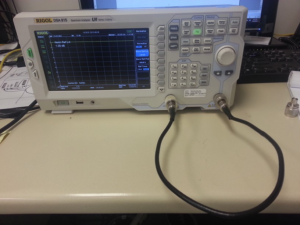
2) Connect the reference cable to the TG out and RF In.

Figure 3: Measuring reference cable


3) Adjust Span of scan for frequency range of interest.
4) Adjust TG output amplitude and spectrum analyser display to view the entire trace.
5) Enable TG.

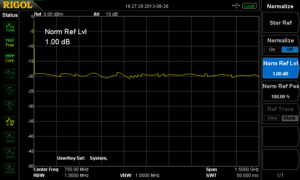
Figure 4: Reference cable insertion loss before normalisation.


6) Normalize the reference insertion loss. This mathematically subtracts a reference signal (stored automatically) from the input signal.
– With the Rigol DSA815 Press TG > NORMALISE > STOR REF and then Enable Normalise

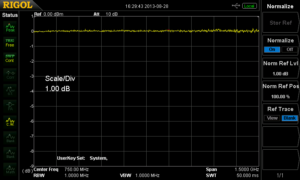
Figure 5: Reference cable insertion loss after normalization.


7) Disconnect the reference cable from the RF input.
8) Place cable-to-cable adapter (BNC barrel or other) and connect to the cable to test.

9) Connect the cable-under-test to test to RF input and enable the TG.

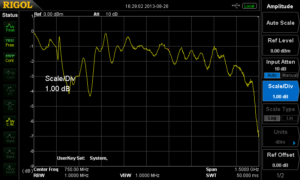
Figure 6: Cable-under-test connected.


The screen displays the cable-under-test losses plus the error of the cable-to-cable adapter.

Figure 7: Cable-under-test loss.


Products Mentioned In This Article:

  • DSA800 Series please see HERE
Posted in Blog | Comments Off on Measuring Cable Loss with a Spectrum Analyser

Using probes with a Spectrum Analyser

Posted on: August 20th, 2021 by James

Using a Passive Oscilloscope Probe with a Spectrum Analyser

Solution: Spectrum Analysers are typically used to measure radio frequency (RF) signals. The signals are usually delivered to the RF input of the analyser with an antenna, magnetic probe, or using a cable with a matched impedance. This minimises impedance mismatching which lowers reflected power and provides the cleanest measurement. This is not always an acceptable connection scheme. Especially in circuits that are highly susceptible to loading when attached to low impedance inputs, like those on most Spectrum Analysers.
This application note covers using a passive probe, typically used with an oscilloscope, with a spectrum analyser. We highlight some of the advantages and trade-offs with this technique as well.
Most analysers feature a 50 Ohm input impedance. In fact, many oscilloscopes with analogue bandwidths above a few hundred MHz also feature a 50 Ohm impedance setting. This lower impedance enables better performance at higher frequencies but can significantly load a circuit with higher impedance.
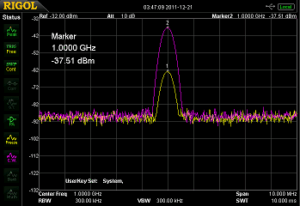
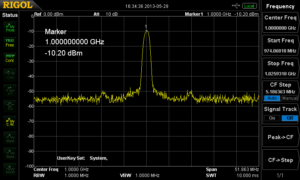
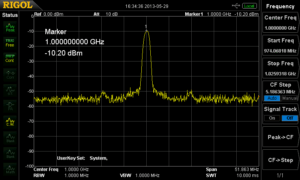
In this application note, we will use an RF signal source to deliver a -10dBm signal at 1GHz (CW Sine Wave) to a spectrum analyser, using a passive 1.5GHz oscilloscope probe.

Here is a screen capture of the signal directly connected to the input of the spectrum analyser using coaxial cable and BNC adapters:

Note that the marker above shows the peak at 1GHz with an amplitude of -10dBm. Now, we connect a 1.5GHz Passive Probe (Rigol RP6150 Passive probe) to the input of the spectrum analyser. The RP6150 is designed to be a 10:1 probe when connected to 50 ohms.
Using a probe with an impedance greater than 50 ohms acts as a voltage divider for signals being delivered to the spectrum analyser. This decreases the voltage to the input and effectively acts as an attenuator. It also has the advantage of lessening the circuit loading that can be caused by connecting the 50 ohm spectrum analyser input directly to the circuit.

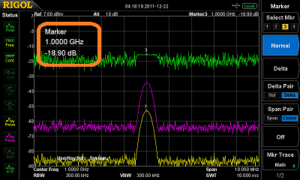
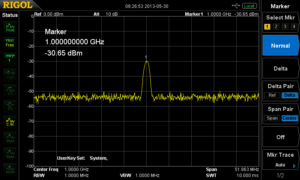
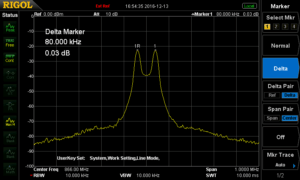
Here is the same signal but instead of a direct connection to the RF input, we are using an RP6150 probe to detect the signal.

Note that the marker now shows -30dBm for the amplitude. This is due to the probe attenuation factor.
Let’s take a closer look at that probe. Recall that power is the square of the amplitude. Therefore, you can calculate the probe power ratio by simply squaring the probe attenuation factor.

Some common probe attenuation ratios can be found using Table 1.

Table 1: Probe Impedance to dB
*With 50 Ohm Input to Spectrum Analyser

Now, we can easily calculate the expected measured power using the equation below: Measured Power (dBm) = Signal Source Power (dBm) – Probe Attenuation ratio (dB)
So, if our Signal Source Power is -10dBm, and the probe attenuation ratio for our RP6150 Passive Probe is 20dB, we would expect to read -30dB on the spectrum analyser as we see in the above screen capture.
For convenience, we can then use the spectrum analysers internal reference setting to adjust for the attenuation of the probe.
Simply press AMPT and set the Ref Level to the probe attenuation ratio in dB. This is a scalar factor that will remove the additional attenuation from the displayed value and give the corrected power value.

Products Mentioned In This Article:

  • RP6150 please see HERE
Posted in Blog | Comments Off on Using probes with a Spectrum Analyser

Keyless Entry System ASK/FSK Analysis

Posted on: August 20th, 2021 by James

RIGOL Technologies extended the RF test system of DSA800 spectrum analyser with additional tests for passive key less entry systems. RIGOL’s test solution is very comfortable to use and much cheaper than other available test systems on the market.
Passive keyless entry [PKE] communication is an electronic lock system mainly used to open cars or buildings without a mechanical key. This lock system works with a passive component (key) which will be activated by a device (e.g. a car) sending a periodical signal to its environment. One most common example is the keyless entry system in a car. The car sends always a constant low frequency [LF] signal around 130 kHz to its environment. If the correct key is closed to the car (~1.5 to 5 meter) then the key recognizes the LF signal and sends back the correct ID with an ASK or FSK modulated RF signal (UHF1). With opening the car door it will be unlocked. With some keys it is also possible to start the car via a button when the key is internally the drivers cab or to open the door of rear trunk. The used frequency of UHF signal depends of location. Mainly ISM2 bandwidth for carrier frequency of 433 MHz will be used in Europe. This application uses also a carrier frequency of 868 MHz in Europe but this frequency range is not part of an ISM bandwidth. USA and Japan use mainly the frequency band of 315 MHz.
Two kinds of procedures are possible3:
1.) Car sends a LF signal with a short wake up signal

1 UHF = Ultra High Frequency (range: 300 MHz to 1000 MHz)
2 ISM = Industrial Scientific and Medical Band are bandwidth which can be used with a defined maximum power in industry, scientific, medical or private applications. ISM defines two types: Type A and Type B. Type B bandwidth can be used without requesting an official license. The most popular ISM band is 2.4 GHz to 2.5 GHz, used for WIFI.
Systems in Modern Cars, Aur´elien Francillon, Boris Danev, Srdjan Capkun Department of Computer Science ETH Zurich 8092 Zurich, Switzerland, §2.2

  • In a defined period a car sends a LF signal with short information to its environment (wake up signal).
  • If a keyless entry key is closed to the car, the key sends an acknowledgement (UHF) to the car.
  • The key and the car starting a data communication with ID check.
  • Car sends an ID to the key. If the ID is correct, the key sends the correct key code. If this key code is correct, then car let you open the door.
    2.) Car sends a LF signal with car ID
  • In a defined period the car sends a LF signal with the car ID to its environment.
  • If a keyless entry key is closed to the car and ID is correct, the key sends the correct key code. If this key code is correct, the car can be opened.
    FSK – Frequency Shift Keying
    Frequency Shift Keying (FSK) is a digital modulation form. The principle of shift keying is to modulate a digital signal to a carrier and the changes are discrete in nature. The basis form is 2FSK. 2FSK is used e.g. in keyless entry systems like a car key or a tire pressure monitoring system. In simplest form of 2FSK modulation two digital state “0” and “1” (2FSK with 1 bit/symbol) will be transmitted with two different frequencies. These two frequencies are modulated to a carrier frequency and both have the same distance to the carrier. The difference to analogue frequency modulation (FM) is that the two transmitted frequency changes in the rhythm of binary data. In FM the frequency changes according to the analogue modulation frequency.
    The distance of both frequencies to carrier is defined as FSK deviation:
  • FSK deviation = Δf
  • fcarrier ± Δf
    Example:
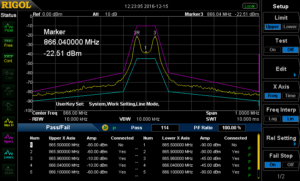
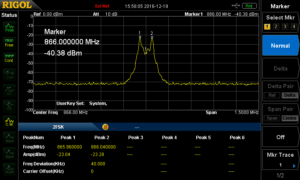
    2FSK with Δf = 40 kHz and fcarrier = 866 MHz is visible in figure 1

Figure 1: 2FSK Signal with FSK deviation of 40 kHz, fcarrier = 866 MHz, tested with DSA832E


The frequency shift of both frequencies is 80 kHz:

  • fmax = fcarrier +Δf = 866 MHz + 40kHz
  • fmin = fcarrier – Δf = 866 MHz – 40kHz
  • fmax – fmin = 80kHz
    Frequency shift is 2 x FSK deviation:
  • Δ(f2-f1) = 2 x Δf
    In constellation diagram of a 2FSK signal is visible in figure 2.
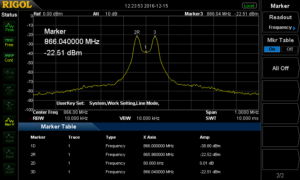
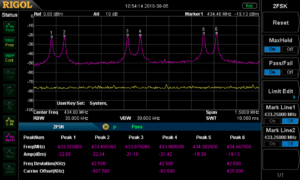
    The tests performed in figure 3 and figure 4 show different kind of important measurement:
  • Signal shall not be higher than customer defined pass / fail curve (see figure 3). Test can be performed with a DSA832, DSA832E or DSA875.
  • Absolute power values of these two frequencies can be analysed (figure 4, marker 2R and 3D)
  • Information of carrier offset can be checked with marker function (figure 4, marker 1D)
  • Difference of power values of two frequencies can be measured (figure 4, marker 2R and 2D)
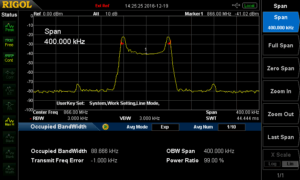
    Another measurement is the analysis of occupied bandwidth (OCP). OCP measures the frequency range which contains 99% of spectral power of signal. The carrier frequency is centered in the middle of this frequency range (see figure 5). OCP can be measured with DSA800 with the option DSA800-AMK.
    Calculation of OCP for 2FSK is defined as follow:
  • OCPBW6 = Data rate + 2 x Δf

Figure 2: Constellation diagram of 2 FSK, carrier frequency is in the middle

Figure 3: pass / fail mask for curve analysis

Figure 4: Measurement values of 2FSK signal (see marker table)

Figure 5: Measurement of occupied bandwidth with a 2FSK signal


4 Speed of DSA832, DSA832E and DSA875 (sweep time of 10 msec: processing time is 30-40 msec.): measure speed of ~50 msec. is possible in normal mode.
5 Following tests can be performed with the option DSA800-AMK: Time Power, Adjacent Channel Power, Channel Power, Occupied Bandwidth, Emission Bandwidth, Signal to Noise Ratio, Harmonic Distortion, Third Order Intercept Point
6 With influence of a roll off factor e.g. with 0.35, OCP will be lower than the calculation.

Example: Data rate: 10kSymbols/sec. and frequency deviation: 40 kHz

  • OCPBW = 10 kSymbols/sec. + 2 x 40kHz = 90 kHz
    Filtering:
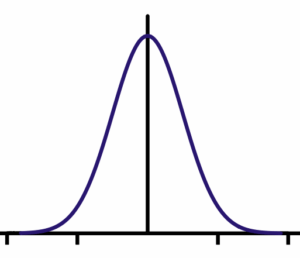
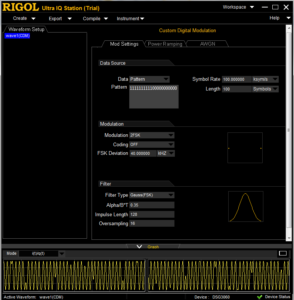
    The target of filtering is, that the digital pulses will get a smoother rounded pulse form (according a gauss clock) to get better spectral results and reduce the bandwidth. In RIGOL’s software ULTRA IQ STATION it is possible to select different filter types. A special Gauss Filter for FSK modulation is available to reduce the bandwidth before transmission. Filtering of FSK modulation with that kind of filter results this modulation form into a GFSK modulation. In this software it is possible to adjust the roll off factor (α = B*T), the impulse length (amount of samples per pulse with duration of one bit) and oversampling (additional sampling to be better compliant of sampling theorem to use a simpler reconstruction filter). A gauss characteristic is visible in figure 6. The length of filter is the product of Impulse length and oversampling values. Roll-off factor α is calculated with:
  • the bandwidth (@-3 dB) of gauss characteristic: B
  • the duration of one bit: TBit
    2FSK Signal can be generated with Software ULTRA IQ STATION and can be downloaded to an RF signal generator with IQ option (DSG3030-IQ or DSG3060-IQ7).
    The clock frequency in the generator will set the wavetable output clock rate. This clock frequency will be calculated from oversampling value and symbol rate (One symbol contains one bit in this 2FSK modulation example).
    Clock frequency = oversampling value * symbol rate

Figure 6: Gauss characteristic

Software S1220 for 2FSK demodulation

DSG3030-IQ: 9 kHz to 3 GHz; DSG3060-IQ: 9 kHz to 6 GHz; IQ Modulator is an Option and contains also external analogue I and Q in-, and outputs

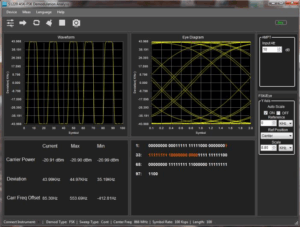
RIGOL provides (option) a demodulation software solution for ASK / FSK demodulation with software S1220. This software works with spectrum analyser DSA832, DSA832E and DSA8758. ASK demodulation will be described at the end of this document.

  • This software displays the symbol waveforms of modulation
  • Eye diagram can be analysed. This is important to see to analyse jitter effects.
  • Specific pattern can be set as reference. Each time the pattern will be transmitted, it will be marked in yellow.
  • Carrier Power, Frequency deviation and Carrier frequency offset will be measured.
  • Manchester encoding is supported.
  • Load and save configuration data

FSK Measurement with DSA815 / DSA705 / DSA710
Software S1220 is usable for
DSA832(E)/DSA875. The measurement speed of
DSA815 / DSA705 and DSA710 is lower than
DSA832(E)/DSA875 and their speed for 2FSK signals are too slow. RIGOL solve this problem with a new option for signal seamless capture (SSC-DSA)9. With the option SSC-DSA 2FSK analysis is also possible to do the FSK measurement with DSA815 / DSA705 and DSA710. With this option the analyser switches into a FFT mode with faster capturing speed. FSK signal measurement (up to three different 2FSK signals) can be performed with that option (see figure 10) in parallel up to 1.5 MHz directly with the device without additional software.
This option has three different main features:

  • Real time trace (RT Trace)
  • Maximum hold function
  • 2FSK signal capture analysis which includes

8 Analyser will be set into a DMA mode (FFT Mode). The analyser can only be controlled with S1220 in DMA mode. 9 This option is only valid for DSA705, DSA710 and
DSA815

o also a maximum hold function parallel to continuous test
o pass/fail measurement according to limit lines to be set
o activation of two mark lines
o measurement of two frequencies from 2FSK signal, amplitude of both frequencies, frequency deviation and carrier offset

Figure 7: 2FSK Signal generation with ULTRA IQ STATION

Figure 8: Software S1220 for ASK / FSK demodulation

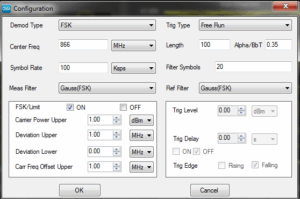
Figure 9: FSK configuration in S1220

Figure 10: 2FSK measurement with DSA815 and SSC option


ASK – Amplitude Shift Keying
ASK is also a digital modulation form used in e.g. keyless entry or radio beacon in navigation. In simplest form, the characters one “1” and “0” of digital signal will be multiplied with a carrier frequency (see figure 12 to figure 14). On/Off Keying is used in keyless entry systems using ASK modulation.
On/Off Keying (OOK):

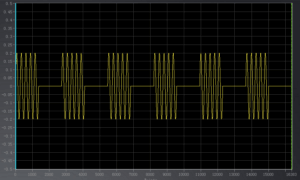
  • Carrier will be on with “1”; carrier will be off with “0”.
  • ASK modulation is 100% (see figure 14) ASK can also be transmitted with a constant carrier. In this case zero “0” will be transmitted with a lower frequency than one “1”. ASK modulation could be e.g. 10% (e.g. for near field communication [NFC] with a bit rate of 424 kbps).
    ASK modulation index will be calculated as follow:
  • m = (A-B)/(A+B) * 100
  • If m = 8-14% then ASK modulation is ~10%.
  • Modulation depth is B/A

Figure 11: 2FSK measurement with three parallel 2 FSK signals with max hold measurement

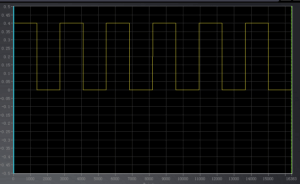
Figure 12: Pulse train with “1” and “0” (digital signal)

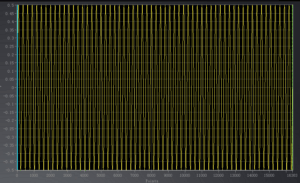
Figure 13: Carrier of ASK (sine signal))

Figure 14: ASK modulation (digital signal * carrier)


ASK bandwidth is defined with:

  • B = 2 x Symbol Rate
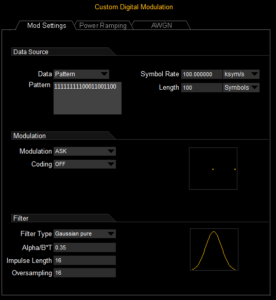
    ASK signals can also be generated in RF signal generator DSG3000-IQ (e.g. DSG3060) together with software ULTRA IQ STATION (see figure 16).
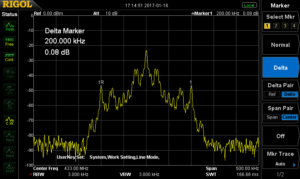
    The frequency range is visible in figure 17. ASK Spectrum shows the bandwidth of 2 x sample rate. This spectrum is visible with different signal lines. This makes sense because the expectation of spectrum is not only an on/off cw signal of this modulation form.
  • A pulse in time range is a SI (sinx/x) function in frequency range.
  • A (constant 0101..) pulse train in time range is a SI function multiplied with a dirac train (like a train of pulses with very small pulse width) in frequency range.
  • The multiplication with a carrier results into a shift of this function to the frequency of carrier.

Figure 15: ASK modulation of 10%

Figure 16: ULTRA IQ STATION settings for ASK generation

Figure 17: Spectrum of ASK


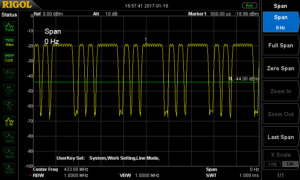
Digital Signal is visible in zero span mode (see figure 18). The pulse train in time range can be analysed in this mode.
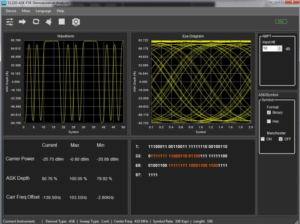
ASK signal can also be analysed with RIGOL’s S1220 ASK-FSK demodulation software. Settings and analysis form are the same like for 2FSK analysis.

Figure 18: Zero Span analysis of ASK Signal

Figure 19: S1220


Products Mentioned In This Article:

  • DSG3000 Series has been discontinued, please see DSG3000B series HERE
  • DSA700 Series please see HERE
  • DSA800 Series please see HERE
Posted in Blog | Comments Off on Keyless Entry System ASK/FSK Analysis

Converting DP800 Record *ROF Files

Posted on: August 20th, 2021 by James

Reading Rigol DP800 Record (*.ROF) Files with Excel 
Solution: The Rigol DP800 series of power supplies have the option to data log the output voltage and current using the Record feature.

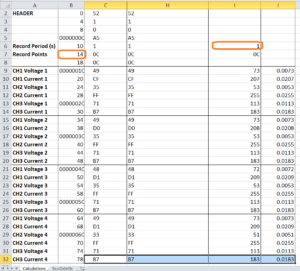
This application note covers how to convert the binary file format native to the record file type (*ROF) to decimal using HxD (A hex-to-decimal software package) and the ReadDPROF file, a worksheet created using Microsoft Excel 2010.
The end of this document describes the format of the data in the *ROF file and the Excel functions that were used to convert each data point to decimal.
Steps:
1) Configure the DP800 outputs and Devices (DUTs) for your experiment
2) Insert a USB stick (FAT32 format) into the USB slot on the back panel of the instrument

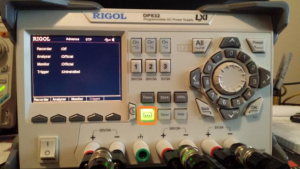
3) Enable the record feature by pressing the (…) button on the front panel

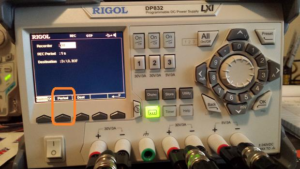
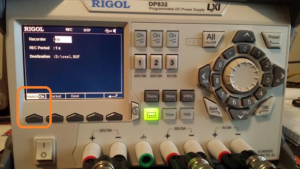
– Set the time per sample to record by pressing Period and use the keypad or wheel to increment the time

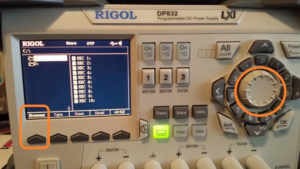
– Select the destination by pressing Det > Select Browser to highlight the external USB (D:) drive

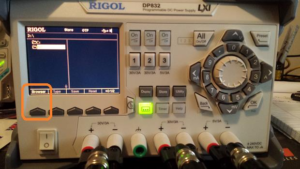
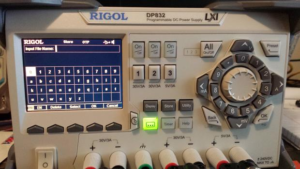
– Press Browser to enter the D: > Press Save and input the file name

– Press OK when finished entering the filename

4) Enable the Recording by pressing SwitchOff. It will turn to SwitchOn when recording is active.

NOTE: The instrument is collecting data as soon as the Recording is enabled.
5) Enable the outputs or run the output profile using the Timer function

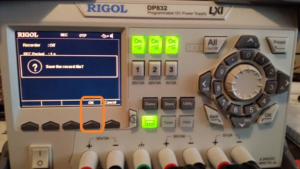
6) Once the test is completed, press (…), and disable the Recorder. As soon as it is disabled, the Record mode will ask if you wish to save the data. Press OK to save.

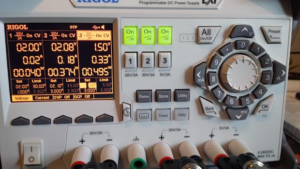
7) In this experiment, I had the following static output values for the duration of the test:
CH1V = 2.00V CH1A = 0.02A CH2V = 2.08V CH2A = 0.18A CH3V = 1.50V CH3A = 0.33A

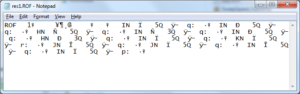
8) Remove the USB stick and insert it into a computer. If you open the *ROF file (res1.ROF is use d in this example) you will see the binary values:

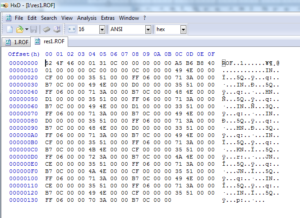
9) Open the ROF file using hex to decimal conversion software. In this example, I am using HxD, as shareware program from http://mh- exus.de/en/hxd/
10) Here is the data in HxD

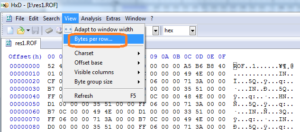
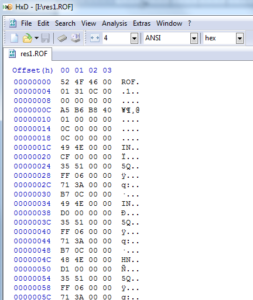
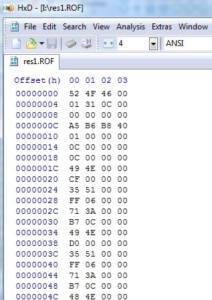
11) Configure HxD bytes-per-row to 4:
Before:

After:

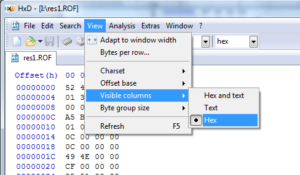
12) Set Visible Columns to Text

13) Now the data should show the Offset and Hex Values

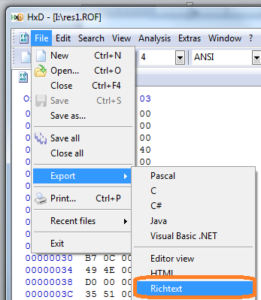
14) Click Export and select

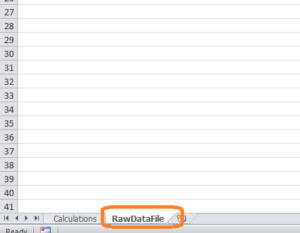
15) Now, open the ReadDPROF.xlsx workbook and select the RawDataFile Tab (at the bottom):

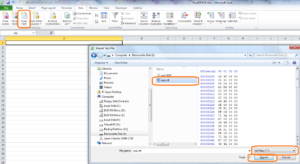
16) Select Data: Import Text, set file type to ALL, select the *RTF file (this is the rich text conversion file from the HxD program)

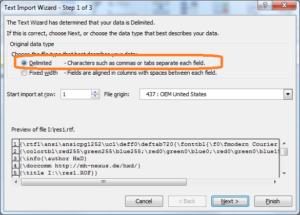
17) Select Delimited and Next

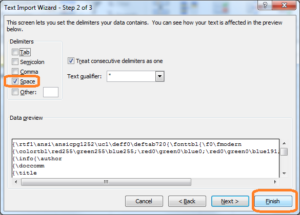
18) Deselect Tab, select Space , and Finish

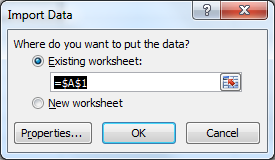
19) Select Cell A1 for import and press OK

20) Now, the formatted data will be transferred to the Excel Sheet

21) Click on the Calculations tab to see the reformatted data

The raw data format (*ROF) returns the record period, number of record steps, the Voltage, and Current of all channels.
The calculations tab of the Excel sheet is designed for use with the three channel DP800s and is only formatted for the first four data points. You can the final row of cells to cover all of the data points for your application as well as re-label the channels.

Each data point in the *ROF file is 4 bytes long. To calculate the actual decimal value, the sheet:
– Reorders the bytes (AA BB CC DD to DD CC BB AA) using the Excel MID function
– Concatenates the bytes using the CONCATENATE Excel function – Converts hex to decimal using the Excel HEX2DEC function
– Divides the decimal conversion by 10,000.

Products Mentioned In This Article:

  • DP800 Series please see HERE
Posted in Blog | Comments Off on Converting DP800 Record *ROF Files

Active loads and the DP800, DP1000 series of Power Supplies

Posted on: August 20th, 2021 by James

Active loads and the RIGOL DP800 and DP1000 Series 1.

1. Introduction
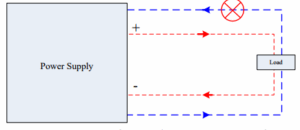
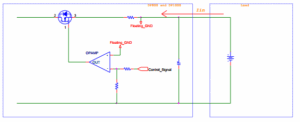
The RIGOL DP800 series and DP1000 series are programmable linear DC power supplies. They can only provide power for a pure load that does not have the ability to output a current.
Active loads, such as those that can provide power (batteries, solar cells, etc..), should not be used with the DP800 series or DP1000 series power supply. Active loads can lead to instability in the power supply control loop and may damage the powered device.
Connecting the power supply to active loads is not recommended.

Figure 1 Improper use of DP800 and DP1000 Series Power Supply


2. Detailed Technical Description
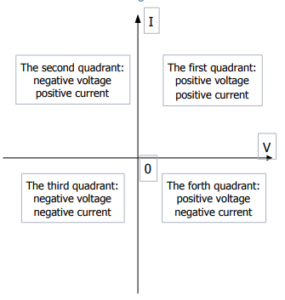
The RIGOL DP800 series and DP1000 series programmable linear DC power supply can only work in the first quadrant (source positive voltage and a positive current) or the third quadrant (source negative voltage and a negative current).
They cannot work in the second quadrant (negative voltage, positive current.. an adjustable load of negative power) or the fourth quadrant (positive voltage, negative current.. as used for a battery discharge test).
When the load itself is a source and the power supply is required to work in the second quadrant as an adjustable load, the control loop may lose control and the power supply will output an uncontrolled voltage. This could damage or destroy the load.

When the power supply works in the fourth quadrant (e.g., used in a battery discharge test), the control loop is also unstable and will quickly drain the battery. This can result in dangerous conditions, including damage to the battery, power supply, and a very high risk of fire and explosion.

2.1.Power Quadrants in more detail
The Cartesian coordinate system is a common representation of power supply output capabilities. The horizontal axis represents voltage, and the vertical axis represents current. The distributions of the four quadrants of the power supply as shown in Figure 2.
The first quadrant: the power supply provides a positive voltage and a positive current (the direction of the current flows from the power supply to the load).
The second quadrant: the power supply provides a negative voltage and a positive current (the direction of the current flows from the power supply to the load).
The third quadrant: the power supply provides a negative voltage and negative current (the direction of the current flows from the load to the power supply).
The fourth quadrant: the power supply provides a positive voltage and a negative current (the direction of the current flows from the load to the power supply).

Figure 2 Distributions of Power Quadrants


2.2.Principle of DP800 and DP1000
Here is a block diagram of DP800 and DP1000 series:

Figure 3 Block Diagram of DP800 and DP1000


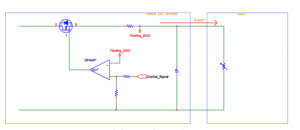
If a current is forced into the supply (I.E. sinking the current), it will directly affect the working status of the MOS transistor and result in instability within the control loop of the power supply as shown in Figure 4.

Figure 4 Current Anti-irrigation Diagram


In addition, the DP800 and DP1000 series power supply outputs do not have an output relay. When a specific output channel is disabled (power off) the output voltage is set to 0V and is regulated by the control loop.

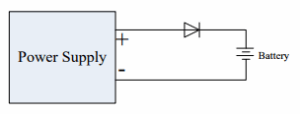
For charging batteries with the DP800 and DP1000 series power supplies, we recommend using constant current mode and implement the circuit shown in Figure 5. The external diode can prevent the flow of current into the supply and prevent damage.

Figure 5 Application Program of Battery Charge Test


Products Mentioned In This Article:

  • DP800 Series please see HERE
Posted in Blog | Comments Off on Active loads and the DP800, DP1000 series of Power Supplies

Debug & Analysis of IoT Power Requirements

Posted on: August 20th, 2021 by James

Power and Function
The relationship between power and function in an Internet of Things (IoT) project is perhaps the most fundamental trade-off a design team needs to address; therefore, it must be made with definitive, testable goals from the customer’s perspective. Expert product development always begins with the an IoT development where the final product is a wrapper around the ‘big idea’, but it is all the more important because of it. It can be tempting to design a product around a battery the engineering team has used before or a display they know how to integrate. This design approach focuses on solutions the engineering team can visualise and not what would satisfy or delight the customer. Instead, viewed through a user’s lens, the product may need to work for a week while recharging only once overnight. It may be important to be on instantly when needed or it may work just as well to push a button to wake the device for use. A battery warning may be required or a sleep mode may be acceptable. The best way to truly understand the options is to start with a definition of as many customer use models as reasonable. Ultimately, there is a trade-off between size/weight and use time/energy but there are many choices for optimization and a testing framework can assist in these determinations.
Estimating Power Usage in Development
An important first step is always to estimate the power required to collect data, make decisions, and take responding action within the requirements of your device. Estimating this usage over time in a theoretical model from specifications of components is useful, but ultimately rigorous, iterative use case testing is important to really understanding your power needs. In a modern IoT platform this measurement may not be straight forward.
A low power System on Chip (SoC) for IoT development may specify a power draw for the low energy Bluetooth (BLE) radio of 5-10 mA but that isn’t transmitting constantly. Depending on the power modes available a device could use tens of milliamps in operating mode while consuming less than several microamps in a global system sleep mode. Additionally, with a lot of chip development focused in this area the state of the art is always changing.
Power Test Methodologies
Traditional electronics battery power consumption could be measured simply with a digital multimeter (DMM) monitoring the current draw over time. Today’s IoT platforms may be more complicated. Often, a pulsed draw that is too quick for a typical DMM to measure is utilized. This requires a faster measurement system to verify. The IoT platform may provide a current measurement test point. An oscilloscope typically uses this to measure the voltage around a small sense resistor in the battery circuit. Depending on the accuracy and resolution you need this may be an effective technique. For instance, if a 10 Ohm resistor is used then every mA results in 10 mV. With a typical oscilloscope noise floor near 1-2 mV this may be noisy. Another option would be to use a current probe to capture the signal. The noise performance may not be as good but the connections are significantly easier if no current measurement test point is provided.
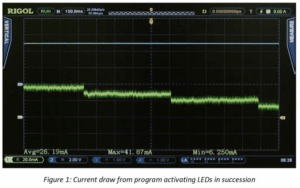
After establishing the best measurement technique for your system, I prefer to begin with a static measurement to establish baseline performance. Typically, I would use a standard example program. In this case, we will view the current draw from a simple program that toggles several LEDs. In this mode, we measure a baseline of about 5 mA. As shown in figure 1, activating each LED also requires 10-12 mA of current on this baseline.
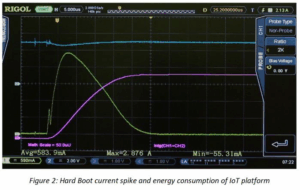
Second, establish a start-up or bootup power requirement for the system. Here, we conducted a test from a hard boot. In addition to power we are also monitoring the energy usage using the integration of voltage * current over time as an approximation. Refer to Figure 2. Understanding the start-up power requirements from different boot states is critical to optimizing the design for sleep or shutdown power mode usage.


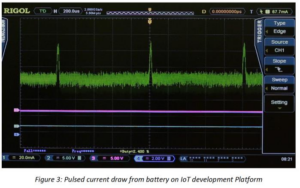
Not all of the peripherals utilize power in a DC fashion like LEDs. Test other peripherals you are using to see how they pull power from the battery. A simple test of the SPI bus demonstrates power being drawn in a pulsed fashion. Analysing the amplitude, width, and repetition rate of these current pulses (shown in Figure 3) enables us to understand the power usage.
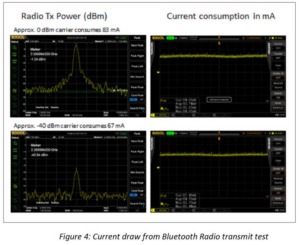
We can use a similar method to test the actual output power of the Bluetooth radio as well as the battery power used during the transmission. This is important once the complete RF antenna layout is completed since power shortages here could result from reflections or mismatch in the RF path. In the test, we leave the Bluetooth Low Energy radio in a constant power transmit to easily monitor the power consumption. In a real use case, the transmit function is never constant, but the power values here are a guide to optimization in on time and power for the radio use cases. In the results below, a transmit power of 0 dBm resulted in 83 mA of power usage while a transmit power of -40 dBm resulted in 67 mA of current. Even in an off state, the radio example uses significant power to prep the radio and peripherals. These baseline values help us to determine the radio power and transmit cycles that may fit into our customer use cases. RF and DC power are shown for these 2 cases in Figure 4.


Once we have determined typical power levels by state and peripheral usage, the next step is to verify that there are no other effects contributing to power usage when in a more dynamic mode of switching operational states. We can test our code examples using a function to both measure instantaneous power and energy over time. With this approach, we can now determine the energy usage of an approach over time and see how different sleep algorithms generally affect battery life. With this level of information, code optimization in response to customer needs becomes much simpler.
In order to complete the IoT design and get a product to market quickly and cost effectively, our information on power usage in different setups and modes is an invaluable tool. The completed tests have enabled us to gather information about static state power usage for our platform and our required peripherals. We also have details on sleep states and boot power from which we can make informed decisions about trade-offs between battery size and use times in our customer use models. With a basic understanding of how power is consumed in our system we can use this as a guideline for incremental improvements throughout our design cycle. For instance, we better understand the advantage of waiting to service the peripherals vs. putting the whole system into sleep mode for a short period. These decisions can then be validated and refined as your application and use cases become clear.
Conclusions and Key Learnings
When working in the fast-changing atmosphere of IoT design and development, reliable test methodologies become increasingly important. As engineers integrate the newest sensors and platforms on the fly to reach highly competitive markets as fast as possible, understanding core customer requirements and trade-offs and how those can be evaluated and compared throughout the development is an important step toward improving the strategic design process.
Whether the challenges of an application are more form or function, issues related to battery life and power usage are fundamental elements of design in the IoT ecosystem that play a significant role in market success. Establishing these principles early in the process and testing them iteratively is one of the best ways to limit budget and schedule risks in the latter stages of the design. Modern, easy to use test equipment that is more affordable than ever can be utilized to develop the limits and baselines that will guide an engineering team through a successful product development.

Products Mentioned In This Article:

  • Digital Multimeters please see HERE
Posted in Blog | Comments Off on Debug & Analysis of IoT Power Requirements

SiFi Technology in Arb Wave Creation

Posted on: August 20th, 2021 by James

Introduction to Waveform Generator Technology
Traditional function and arbitrary waveform generators have for many years been built on one common technology – DDS or Direct Digital Synthesis. DDS allows an instrument to create waveforms by tracking the phase of a reference clock and outputting the closest sample to the desired signal at each output sample time. DDS has enabled quality performance at a reasonable price for generations of function generators.
Today, new technologies are emerging that enable instruments to utilise both the advantages of DDS while improving signal fidelity and usability in more applications than ever before. Technologies like Keysight’s improving signal fidelity in waveform generators. SiFi technology was created for Rigol’s latest arbitrary waveform generator family, the DG1000Z series. These instruments combine the true point to point waveform generation of arbitrary signals and redesigned output hardware to create arbitrary waveforms with flexibility and accuracy not available a few years ago. Combine this with the available deep memory and SiFi technology enables emulation of precise arbitrary signals over longer periods without losing fidelity.

Understanding DDS or Direct Digital Synthesis
The DDS method uses phase to determine the correct output over time. Let’s look at an example. Assume we have an 8192 point arb that we want to play back at 6.25 kHz. We load an arbitrary waveform made up of 400 cycles of a Sine wave. Therefore, we should have a fundamental frequency of 2.5MHz. The DDS generator assigns a phase value to each point in the wave. The first point is 0 degrees. Each point after that add an increment of 360 degrees/8192 allowing for all the points to be played in a period and the first point to be up again when it returns to 0 degrees. That increment is approximately 0.044 degrees. Driven by the clock source (often a PLL) the instrument essentially measures its phase from start every 5 ns (the instrument has a 200 MSa/sec update rate – or once every 5 nsec) and chooses the closest phase value to select from the arb table. In this example, each 5 ns represents 360 degrees/ (160 us / 5 ns) = 0.01125 degrees. Therefore, the arbitrary waveform looks like figure 1 in the UltraStation software and then the actual output values that are selected over MHz fundamental frequencies are shown in figure 2.
What is worth noting about the output is that even though we are able to output samples much faster than is required we have created some distortion. Namely, some of the points in the arb, which are all evenly spaced, are repeated for 10 ns and some will be repeated for 15 ns. The lack of smooth, continuous changes created by the file’s quantisation of the sine wave causes this distortion. The distortion is increased significantly when the playback period is adjusted slightly because the DDS algorithm is forced to make tougher decisions about which point to output since the ideal output is now further from the available points which were chosen for the initial playback period. This is critical because it is the careful sampling to generate the correct, high fidelity arbitrary signal which is the time consuming and difficult task. Using DDS, engineers who want high fidelity signals must go back and resample, recreate, and reload an arbitrary waveform whenever they want to tweak the playback period. DDS forces engineers to choose between convenient and efficient signal generation or high fidelity and accuracy during playback.

Figure 1: 400 cycles of Sine wave in an arbitrary waveform shown in Rigol UltraStation Software

Figure 2: Arbitrary wave data table showing DDS algorithm for playback


SiFi technology overcomes this basic effect on signal integrity with a new architectural approach. Let’s take the same signal and example and test it in SiFi mode. Here we load the same arbitrary wave. We simply set the output sample rate to be 8192 points * 6.125 kHz = 51.2 MSa/sec. Now, after changing that one setting we investigate the output of the signal with a spectrum analyser. The data is overlaid with the DDS mode data in Figure 3. To create this spectrum we used Max Hold on each trace while we changed the playback frequency for DDS and the output sample rate for SiFi to create fundamental frequencies between 1 and 2.5MHz. As we adjust the playback parameters in real time, DDS mode creates signal distortion at various frequencies across the 2-10 MHz band shown in yellow. Using the same exact arbitrary waveform a simple switch to SiFi mode creates much more even waveforms with significantly higher signal fidelity shown in purple.
This is a simple example of the difference between the 2 architectures, but even advanced users may be unaware of the trade-offs they are making with a traditional signal generator. Most users would assume that a 30 or 60 MHz arbitrary generator is capable of a nearly perfect 1 MHz sine wave. It all depends on the importance of signal fidelity to the application at hand. After all, many engineers look at output sample rate as a key specification but it doesn’t tell the whole story. In the example we just did, the DDS wave was being output at 200 MSa/sec while the SiFi wave was being output at about 50 MSa/sec. Still, the SiFi wave produced a much cleaner signal. The more complex the arbitrary waveform the more difficult it becomes to understand the impact of the sampling technology. Artefacts from this resampling can have profound impact on the frequency content of a true arbitrary wave and there is no way to easily separate the real wave from the sampling artefacts. This also means that buying a DDS waveform generator with a higher output sample rate invariably alters the frequency components of the signal even when playing the same arbitrary file. With SiFi technology this is not case.
Signal fidelity is critical to design engineers using waveform generators in their testing. Using a generator with SiFi technology improves the accuracy of waveforms you reproduce by allowing the engineer maximum flexibility in setting the output rate of their arbitrary waveform.

Figure 3: Comparison of 1-2.5 MHz Sinusoidal arbitrary waves. Yellow is DDS generated. Purple is SiFi technology.


Enabling more functions and waveform types
Improved signal fidelity is great, but signal quality alone doesn’t make a great technology or a great instrument. Alongside Rigol’s SiFi technology is the capability to create more unique waveform types without having to build custom arbitrary waves. This includes the unique ability to build harmonic waves on the instrument front panel where the engineer describes the phase and amplitude of each harmonic element of the starting frequency. Figure 4 shows how an engineer can define a harmonic wave from the instrument’s front panel. Harmonic waves let the engineer set amplitude and phase values for the fundamental frequency up through the 8th harmonic. Traditionally, engineers who need signals which are more easily defined in RF space would have to define each frequency, amplitude, and phase and sum them together into an arbitrary wave. To create the wave in RF space the user would then have to resample the output in time domain with the correct sample spacing. This is a cumbersome way to generate and work with arbitrary waves. Harmonic waves are much easier to create. Simply define the power and phase at each frequency at a multiple of the fundamental and the instrument automatically combines them and plays them back. Figure 5 shows the matching spectrum to the signal defined in figure 4. Figure 6 is the same wave captured on a scope. This is the time domain arbitrary data a user would have to create, load, and configure on a traditional generator to get the same signal they can now quickly build from the front panel. With these new capabilities empowered by SiFi technology, the Rigol DG1000Z series waveform generators add significant power and flexibility to the engineer’s bench.

Figure 5: Harmonic Wave Spectrum Analyzer measurement

Figure 6: Harmonic Wave Oscilloscope measurement


Developing Powerful and Flexible Deep Memory Arbitrary Waveforms
The key technological advance of SiFi is the ability to deliver true point to point arbitrary waves. Without this capability arbitrary waves become notoriously difficult to generate accurately and require additional behind the scenes work by engineers slightly adjusting sampling and points to improve the overall signal fidelity. This task becomes considerably more difficult when using deep memory arbs that contain millions of points. With SiFi technology, engineers can create longer, more precise arbitrary waveforms. In the adjustable sample rate mode users can define a signal that will be output at up to 60 MSa/sec. With up to 16 Million points of memory depth, it is then possible to create completely custom point to point waveforms up to 250 milliseconds in length while still maintaining the full output sample rate. The traditional difficulty with working with such long waveforms is they are a challenge to edit. For instance, Microsoft Excel 2013 only allows just over 1 million rows of data. Using a DDS generator, to make a slight change to the playback period you need to either resample the wave or deal with artefacts created by the DDS phase based sample selections. With SiFi technology, you can leave the precise waveform as sampled and simply adjust the output sample rate. This saves the considerable time and effort of editing and reloading long waveforms to the instrument.
While SiFi makes arbitrary waves easier to manipulate and more flexible once they are created, users still need a reliable method of generating, editing, and loading long waveforms to their instrument the first time. SiFi enabled generators come with free UltraStation software for waveform editing. This tool enables importing, combining, and freehand editing of deep memory waves. Waveforms can then be loaded directly to the instrument over LXI or USB. In addition to the time domain, the editing software has a spectrum view to see the power and phase of the signal you created as shown in Figure 7. The combination of deep memory, SiFi technology, and enabling editing software empowers engineers to reproduce more flexible, more precise waveforms than traditional DDS technology alone.

Figure 7: Arbitrary waveform spectrum view in UltraStation software


Unprecedented Value
Rigol’s SiFi technology and the DG1000Z series waveform generators allow engineers to cover more signal reproduction applications than ever before with improved signal fidelity, flexibility, and ease of use. The deep memory capabilities and hardware design of the instruments work together with SiFi sampling technology to make these improvements possible and deliver unprecedented value to the engineer’s bench.

Products Mentioned In This Article:

  • DG1000Z Series please see HERE
Posted in Blog | Comments Off on SiFi Technology in Arb Wave Creation